Norton AntiVirus Plus: what it does, what it costs and who it suits
A plain-language look at Norton’s entry-level security product: what it actually includes, how antivirus protection works, what renewal really costs, and when the protection already built into your computer may be enough.
What Norton AntiVirus Plus is
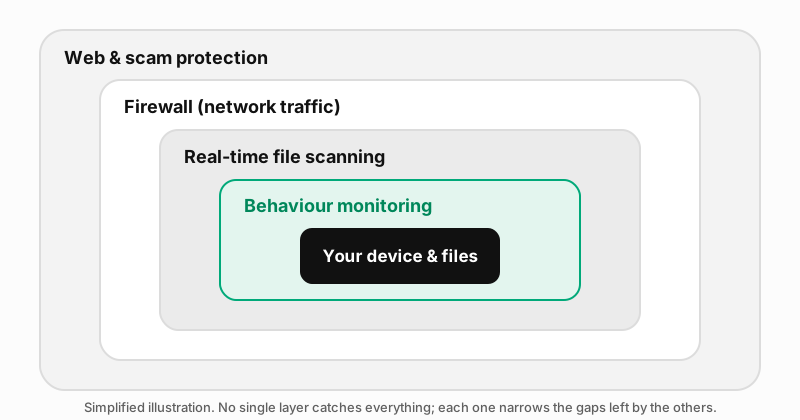
Norton AntiVirus Plus is the entry-level paid plan in Norton’s consumer security range. Norton is a brand of Gen Digital Inc. The plan centres on malware protection: it scans files and running programs in real time, blocks known malicious websites and includes a firewall. Norton’s higher tiers, sold under the Norton 360 name, add services such as a VPN and dark-web monitoring.
Norton’s US product page currently lists the plan as covering Windows, macOS, Android and iOS, with one-device and five-device options. The options available to you depend on the country you buy in. Check the product page for your region before you rely on a particular platform or device count.
What is included
This table reflects Norton’s US product page as checked on 24 September 2026. Some features, particularly the newer scam-protection tools, are not offered in every country.
| Feature | Included in AntiVirus Plus? | Notes |
|---|---|---|
| Real-time antivirus, malware, ransomware and hacking protection | Yes | The core of the product. |
| Firewall | Yes | “Smart Firewall” on Windows, “Firewall for Mac” on macOS. |
| Password manager | Yes | Stores and fills passwords across devices. |
| Cloud backup | Yes, 2 GB | Enough for important documents, not for a large photo library. Norton has historically offered this on Windows; check whether it is available on your platform. |
| Scam and deepfake protection | Listed on the US page | Availability varies by region. |
| VPN | No | Included in Norton 360 plans. |
| Dark-web monitoring | No | Included in Norton 360 plans. |
| Virus Protection Promise | Yes, with conditions | Norton says it will refund you if its experts cannot remove a virus from your device. The promise applies only while automatic renewal is switched on. |
Partner link: if you buy through it, CHOPENKO s.r.o. earns a commission. It costs you nothing extra – the price is the same as going to Norton directly.
How modern detection works
People often picture antivirus software as a list of known viruses that files are compared against. That list still exists, but it is only one of several techniques a modern product uses:
- Signatures. These are fingerprints of known malicious files. They are fast and accurate for threats already catalogued, but they cannot recognise something new.
- Heuristics. The product inspects a file’s structure and code for traits typical of malware, such as unusual packing or code that tries to hide itself.
- Behaviour monitoring. The product watches what programs actually do after they start. Examples of suspicious behaviour are editing many documents in quick succession, injecting code into other processes or disabling security settings.
- Cloud reputation. The product checks a file or website against the vendor’s online database. That database knows how common the file is and whether it has been flagged elsewhere.
- Web filtering. The product blocks known phishing and malware sites before the page loads, which stops many attacks before any file reaches your device.
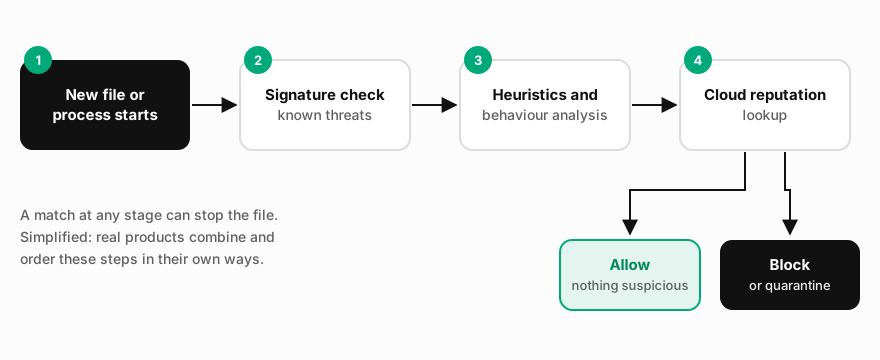
Why so many layers? The volume of new malware is enormous. The German AV-TEST Institute says it registers over 450,000 new malicious programs and potentially unwanted applications every day. Most of these are minor variations on existing families, and heuristic and behavioural methods exist precisely to catch variants that no signature describes yet.
What independent tests can tell you
You cannot judge detection quality by using a product for a few weeks. Independent laboratories run controlled tests with large sets of fresh malware and real-world attack scenarios. The best known are AV-TEST (Germany), AV-Comparatives (Austria) and SE Labs (UK). Norton’s consumer products appear regularly in their public results.
We deliberately do not quote a detection percentage here. Results change from one test round to the next, different labs measure different things, and a figure copied into an article soon goes out of date. Instead:
- Look up the latest round on the lab’s own website, and check which product version and operating system were tested.
- Read the false-positive results as well as the protection scores. A product that blocks everything, including legitimate software, is hard to live with.
- Prefer consistent results across several rounds and labs over a single headline result.
Our guide to how independent antivirus tests work explains the categories in more detail.
Ransomware protection and backups
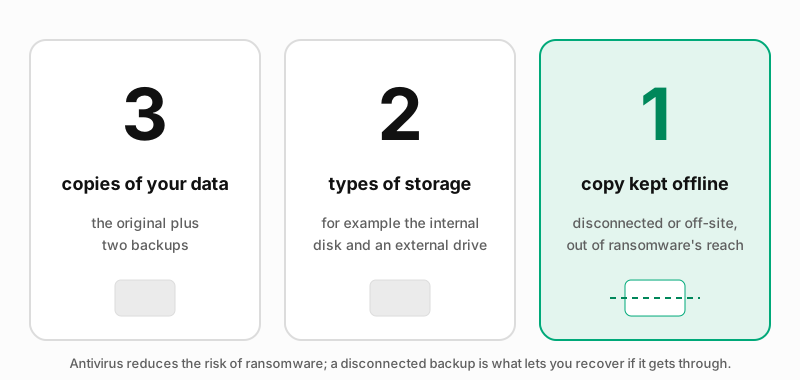
Ransomware encrypts your files and demands payment for the key. Norton lists ransomware protection among AntiVirus Plus’s core functions. In general terms, security products block known ransomware and watch for behaviour typical of it, such as a process rapidly rewriting large numbers of documents.
No product can guarantee it will stop every ransomware attack, and government agencies such as the US Cybersecurity and Infrastructure Security Agency (CISA) and the UK National Cyber Security Centre (NCSC) consistently recommend offline backups as the real safety net. The 2 GB of cloud backup in AntiVirus Plus helps with a folder of key documents. For photos and larger collections you will need an external drive or a larger backup service.
Performance impact
All real-time security software uses some processor time and memory, because it inspects files as they are opened and checks programs as they start. How noticeable that is depends on your hardware, on what you do, and on when full scans run. Independent labs publish separate performance measurements covering tasks such as copying files, installing applications and opening websites. Those results are a better guide than any vendor claim, or ours.
Practical tips that apply to most security products:
- Schedule full scans for times when you are not using the computer.
- Run only one real-time antivirus product at a time. Two products scanning the same files slow the system and can conflict with each other.
- Keep the product and your operating system updated. Updates often improve efficiency as well as protection.
Compared with built-in protection
Being fair to readers means saying this clearly: the protection built into modern operating systems is not a toy. Microsoft Defender Antivirus, part of Windows 10 and Windows 11, provides real-time scanning, cloud-delivered protection and behaviour monitoring, and appears in the same independent lab tests as paid products. macOS includes its own built-in malware protection (XProtect) and checks that downloaded apps come from identified developers.
So why pay? The main reasons people choose a product like Norton AntiVirus Plus are:
- one place to manage protection, a password manager and a small amount of backup;
- web protection and scam-protection features that work across browsers;
- a support service and, subject to its conditions, the Virus Protection Promise;
- protection for a Mac or mobile device under the same subscription, where your plan covers it.
If you already use a separate password manager, keep regular backups and are comfortable with the built-in tools, you may find the free protection sufficient. That is a legitimate choice.
What it does not include
AntiVirus Plus is a focused plan. According to Norton’s product page it does not include a VPN or dark-web monitoring; these are part of Norton 360 plans. It is also not an identity-theft insurance or restoration product. If those services matter to you, compare the Norton 360 tiers, or buy the services separately, rather than assuming the entry plan covers them.
Pricing, renewal and refunds
We do not print prices, because they change often and differ by country, currency and promotion. What matters more is how the subscription works:
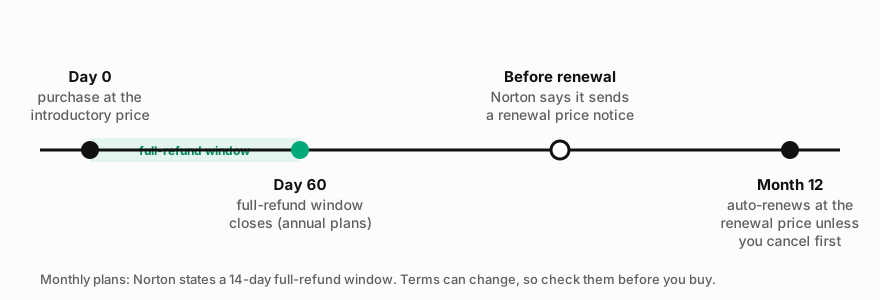
- Automatic renewal. Norton states that subscriptions renew automatically unless you cancel the renewal before billing, and that annual subscribers receive advance notice of the renewal price.
- The renewal price can be higher. The first term is often sold at an introductory discount. Check the renewal price shown at checkout, not only the first-year price.
- Refund window. Norton’s support pages state that annual subscriptions can be refunded in full if you ask within 60 days of purchase (and within 60 days of each annual renewal charge). Monthly subscriptions can be refunded in full within 14 days of purchase. Pro-rated refunds may be available after those windows.
- Virus Protection Promise. This applies only while automatic renewal is switched on. If you turn auto-renewal off, you may lose it.
- EU withdrawal right. Consumers in the EU may also have a statutory right of withdrawal for online purchases. Norton publishes a support article on how to exercise it.
Partner link: if you buy through it, CHOPENKO s.r.o. earns a commission. It costs you nothing extra – the price is the same as going to Norton directly.
Privacy considerations
Security software needs deep access to your system to do its job, and it sends some data back to its vendor, for example information about suspicious files for cloud analysis. You need a Norton account to buy and activate a subscription. Before installing, read Norton’s product privacy notice, and check which optional data-sharing settings you can switch off after installation. EU residents have rights under the GDPR regarding their personal data, including access and erasure, which they can exercise directly with the vendor.
Installing and switching
- Uninstall any other third-party antivirus first, using its own uninstaller. (On Windows, Microsoft Defender steps aside automatically when another antivirus registers, so you do not need to remove it.)
- Download the installer only from Norton’s own website or your Norton account. Avoid “cracked” or third-party download sites.
- Sign in or create your Norton account, then run the first full scan when convenient.
- Review the settings: when scans run, which notifications you receive, and whether the browser extension is installed in each browser you use.
- Note the renewal date and the renewal price shown in your account.
Who it suits
A reasonable fit if you want one paid product, from a long-established vendor, that combines malware protection, a firewall, a password manager and a little backup, and you do not need a VPN or identity services.
Look elsewhere or compare first if you want a VPN or identity monitoring (look at Norton 360 or alternatives), if you have many devices to cover, or if the built-in protection on your system plus good habits already meets your needs.
Business users who manage several machines should look at products built for central management rather than a consumer plan.
Summary
Norton AntiVirus Plus is a focused, entry-level security subscription from a well-known vendor. Its value lies in bundling real-time protection, a firewall, a password manager and a small cloud backup under one account. Before you buy, check the latest independent test results, the renewal price rather than just the introductory price, and whether the features you care about are offered in your country. Whatever you choose, keep your system updated and keep an offline backup. Those two habits matter as much as any antivirus product.
Partner link: if you buy through it, CHOPENKO s.r.o. earns a commission. It costs you nothing extra – the price is the same as going to Norton directly.
Frequently asked questions
- Does Norton AntiVirus Plus include a VPN?
- No. According to Norton’s product page, the VPN is part of Norton 360 plans, not AntiVirus Plus.
- Will it renew automatically?
- Yes, by default. Norton states subscriptions renew automatically unless the renewal is cancelled before billing. You can manage this in your Norton account.
- Can I get a refund?
- Norton’s published policy offers a full refund within 60 days for annual subscriptions and within 14 days for monthly ones, with pro-rated refunds possible afterwards. Check the current policy for your country.
- Do I still need backups?
- Yes. Antivirus reduces the risk of infection, but no product can guarantee to stop every attack. An offline backup is what lets you recover.
- Is the free protection in Windows enough?
- For many careful users it can be. Microsoft Defender is a capable real-time antivirus. Paid products mainly add convenience, extra tools and support.
Sources
All sources were consulted on 24 September 2026.
- Norton, “Norton AntiVirus Plus” product page: us.norton.com/products/norton-antivirus-plus
- Norton Support, “Norton annual and monthly subscription refunds”: support.norton.com
- Norton Support, “Norton Cancellation and Refund Policy”: support.norton.com
- Norton Support, “Exercise your Right of Withdrawal”: support.norton.com
- AV-TEST Institute, malware statistics: av-test.org/en/statistics/malware
- AV-TEST, test results for home users: av-test.org/en/antivirus/home-windows
- AV-Comparatives, test results: av-comparatives.org
- SE Labs, public reports: selabs.uk
- Microsoft Learn, “Microsoft Defender Antivirus in Windows overview”: learn.microsoft.com
- Apple, “Protecting against malware in macOS”: support.apple.com
- CISA, StopRansomware guidance: cisa.gov/stopransomware
- UK National Cyber Security Centre, “Mitigating malware and ransomware attacks”: ncsc.gov.uk